Memory and CPU Overhead of Headless Browsers in Agent Fleets
Headless browsers consume far more memory than most teams budget for at scale.

- Written by
- Danielle Osei-Bonsu
- Published
- September 25, 2026
- Reading time
- 11 min read
- Sources cited
- 8 sources ↓
What this covers
Running a headless browser fleet at scale means paying a resource tax that most teams don't budget for, and that cost becomes visible only when the bill arrives as an outage. A proof-of-concept script running one Playwright session looks cheap because it is cheap: one process, a few hundred megabytes, gone in seconds. Running that same workflow tens of thousands of times a day, though, means every one of those runs drags a full browser stack behind it, and the arithmetic stops being flattering.
Headless Chrome is not a slimmed-down version of the real thing, and treating it like one is the mistake that sinks most fleet budgets before they're written. Every instance spins up a browser process, a renderer process, a network service process, a GPU process, and a handful of utility processes on top. What looks like one "browser session" to an orchestrator is, at the OS level, several processes bound together, and at fleet scale that means thousands of running processes for what a dashboard might describe as a few hundred jobs. The cold-boot floor is 50 to 150 MB of resident memory before a single page even loads, and that number is not what anyone should plan a fleet around. A browser under real navigation load costs 300 to 500 MB per instance. Write that second number into the capacity plan, not the first one.
How Chrome's memory model cost accumulates across a session's lifetime
Ten concurrent Chrome sessions, each running at 200 to 400 MB, already adds up to 2 to 4 GB of RAM before any application logic runs, marking the starting line rather than the ceiling. That's the starting line, not the ceiling. Chrome's memory use doesn't plateau the way a well-behaved server process might: an instance that opens at 200 MB can climb past 1 GB after enough page navigations, simply because Chrome doesn't release memory cleanly as a session ages. Tabs close, but the processes behind them don't always give the RAM back.
Then there's /dev/shm. Chrome relies heavily on shared memory to pass rendered bitmaps between the browser process and its renderers, and a default Docker container caps that shared memory at 64 MB, nowhere near enough. That's nowhere near enough. When Chrome hits that ceiling, it doesn't slow down or degrade gracefully. When Chrome hits that ceiling, it crashes.
Idle browsers make the accounting worse, not better. Keeping a pool of browsers warm and ready, rather than paying launch costs on every request, counts as sound engineering in principle. But browsers quietly consume more memory the longer they sit open, even with no active task running. A warm pool with no recycling policy is a slow leak with a delayed invoice.
The AI agent multiplier: what VLM-backed agents add on top of browser overhead
AI agents don't just open a page and scrape it. They click, scroll, wait, re-read the screen, and click again, often dozens of times per task, and each of those actions multiplies the baseline browser cost that a traditional scraper only pays once. Browser-use agents still create real browser processes, still costing 50 to 200 MB of memory apiece. The per-process cost hasn't changed. What's changed is how deep each session runs before it's done.
Layered on top of that is a cost text-only LLM agents never carry: a vision-language model that has to sit resident in VRAM before the first screenshot even arrives. There's no cold-start option here, because the model has to be loaded and ready the moment the agent needs to "look" at a page. A 1080p screenshot, depending on how the model tiles it for encoding, turns into somewhere between 512 and 2,048 visual tokens. Running 40 to 50 of these agents concurrently, each holding a screenshot in active KV cache, makes the VRAM profile stop looking like a chatbot serving conversations and start looking like an image batch inference job.
VLM and browser pool sizing math for a self-hosted agent fleet
Qwen2.5-VL 7B at FP16 needs around 17 GB just for model weights, plus another 2 to 4 GB per concurrent agent session. On a single H200, that leaves enough headroom to run 40 to 50 concurrent browser agents comfortably. Llama 4 Vision tells a different story: 109B total parameters with 17B active, and at BF16 precision the full model needs roughly 218 GB of memory. INT4 quantization cuts that to around 55 GB, which fits on a single A100 80GB card with room left over for KV cache.
The lesson those two numbers teach is a planning discipline: VLM VRAM budgets and browser pool memory budgets have to be sized together, on the same node, at the same time. Sizing the GPU for the model and the CPU fleet for the browsers as separate line items leaves the hardware underprovisioned the moment both systems run at full load simultaneously, and by the time anyone notices, the fleet is already dropping jobs.
Latency compounds the concurrency ceiling in a way conversational AI never has to deal with. A chatbot user tolerates a pause. A browser agent can't: a visible gap of 200 to 500 milliseconds between "agent clicked" and "agent reads the result" reads as a stall, and a system full of stalls reads as broken, even if nothing has technically failed.
Playwright vs. Puppeteer: what the memory difference is at runtime
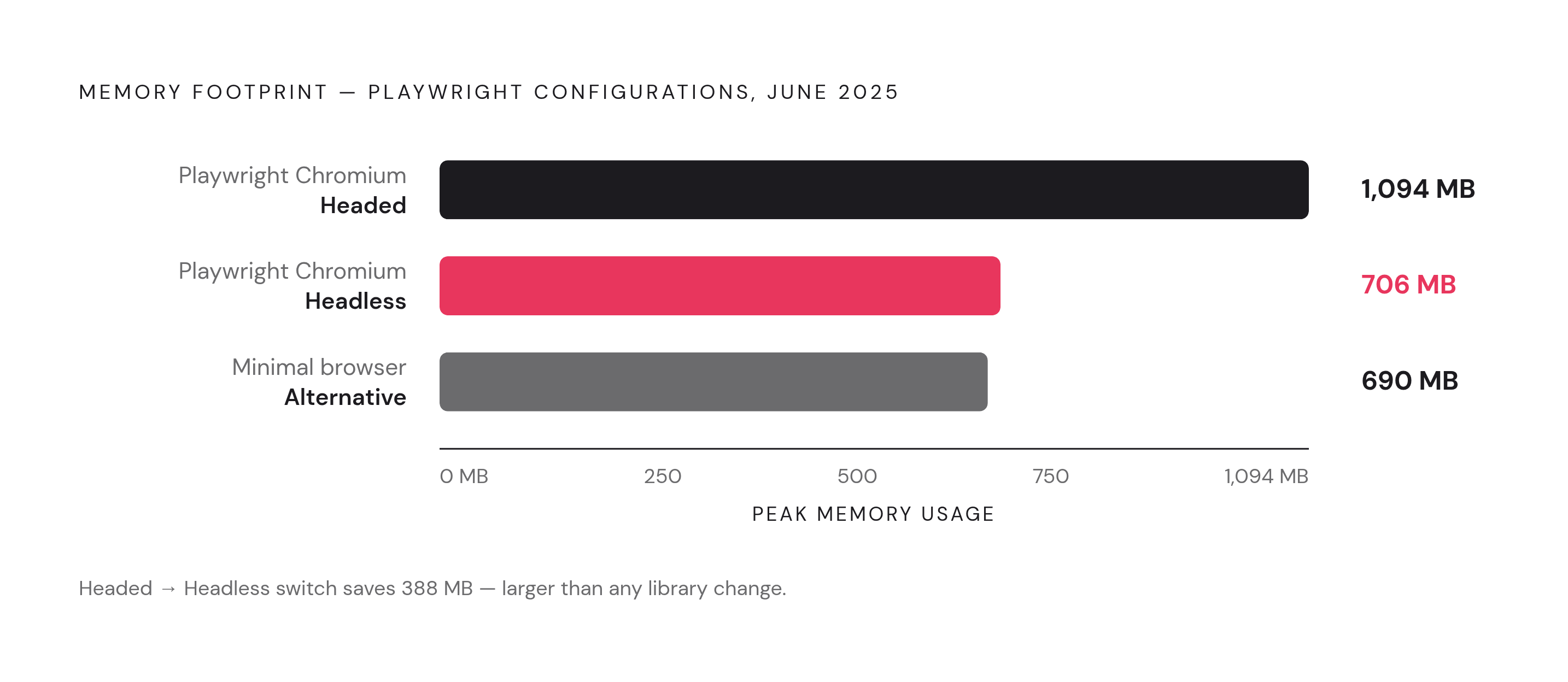
By 2026 the tooling landscape has settled into a clear pecking order. Playwright is the default choice for new automation work, Puppeteer still fits teams building Chromium-only pipelines, and Selenium has mostly retreated into legacy QA suites nobody wants to rewrite. Benchmarks measured in June 2025 put Playwright running Chromium in standard headed mode at a peak of 1,094 MB. Switching that same session to headless mode drops it to 706 MB, and the leanest minimal-browser alternatives measured came in at 690 MB.
The single biggest saving available to any team is turning off the display, full stop. Going from headed to headless mode delivers a multi-fold improvement in throughput and roughly half the memory footprint of a windowed session. When both tools drive the same underlying browser engine, Playwright and Puppeteer sit in roughly the same memory range. Teams arguing over which library's API to write against are optimizing the wrong variable. Headless versus headed, and how the pool gets managed, is where the real money sits.
The four failure modes that turn memory pressure into outages
Four distinct failure patterns turn ordinary memory pressure into a fleet-wide outage, and each hides in a different place.
Memory leaks are the slowest and most deceptive. An instance opens at 200 MB, climbs steadily past 1 GB over a long session, and eventually the OS kills it outright, taking whatever job was running down with it. Chrome doesn't give memory back cleanly as a session ages, so left unmanaged, this is the default case, not an edge case. It's the default trajectory.
Zombie processes are the second failure mode, and they're sneakier because the orchestrator doesn't notice. When Chrome crashes mid-task, the browser process sometimes fails to fully terminate. The orphaned process keeps consuming CPU and memory while the orchestrator marks that slot as available for the next job. The fleet slows down in practice while the dashboard insists everything's fine.
Docker's /dev/shm exhaustion is the third, and it catches teams by surprise because the failure looks abrupt rather than gradual. The default 64 MB cap causes Chrome to crash outright rather than degrade. The fix is either the --disable-dev-shm-usage flag, which forces Chrome to fall back on /tmp instead of shared memory, or raising the Docker or Kubernetes shm-size setting well above the default.
Idle drain rounds out the list. Browsers cache aggressively even while sitting unused, and a warm pool with no recycling policy quietly turns the launch-cost savings it was built to capture into a slow, ongoing memory leak instead.
Optimization patterns that reduce per-instance overhead without sacrificing reliability
The warm pool pattern is the starting point for most fleets that get this right: launch one browser, and for every new task, open a page inside it rather than a whole new browser. Each page render takes about 5 milliseconds, cheap enough to do constantly, while the browser itself lives for the entire lifetime of the worker process. That one change eliminates the process-initialization overhead that otherwise dominates at high request rates.
A recycling policy has to sit on top of that pool, because trusting a browser to behave indefinitely isn't a strategy; it's a bet against Chrome's own memory behavior. Bound its lifetime instead, and track Resident Set Size in real time with something like Prometheus. If the reuse limit on a pool is set too high, the memory usage graph shows a clean linear climb, about as unambiguous a warning sign as infrastructure monitoring gets.
Resource interception cuts cost at the page level rather than the pool level. Blocking images, stylesheets, fonts, and media through something like page.setRequestInterception reduces both memory and bandwidth per page. It's a standard technique for any scraping or agent workload that doesn't need pixel-perfect visual fidelity to do its job.
Process reaping closes the loop on the zombie processes described above. Running tini as the Docker entrypoint makes sure crashed Chrome processes actually get cleaned up by the OS instead of accumulating quietly in the background.
What managed browser platforms cost versus self-hosted fleets
Self-hosted Chrome fleets running on Kubernetes cost somewhere around $0.02 to $0.05 per browser-hour. At full utilization across a 1,000-browser fleet, that works out to roughly $480 to $1,200. Cloudflare's Browser Rendering product prices at $0.09, plus $2.00 for each additional concurrent browser beyond what's included; the paid plan bundles in 10 browser hours and 10 concurrent browsers, with the per-account concurrency ceiling raised to 120. Default browser timeout is 60 seconds, extendable to a 10-minute keep-alive.
The premium a managed platform charges over raw compute buys someone else's responsibility for the memory leak management, the zombie process reaping, the shared memory tuning, and the version drift monitoring described above. That's the actual product being sold, not convenience.
That's also where the build-versus-buy decision tends to get made in practice. Teams build their own Playwright or Puppeteer setup, get it working well enough to demo, and then hit a wall the moment concurrency, stealth, and uptime all have to hold at once. Call the wall what it is: operational complexity that is absent in a demo but appears in an on-call rotation.
Lightweight browser engines built specifically for agent workloads
A newer category of tooling has started asking a more basic question: why should an AI agent pay Chromium's full resource bill for features it never uses?
Cloudflare Kitesurf answers that question by rejecting Chromium. It's built from the ground up for AI agents rather than human users, runs inside V8 isolates on Cloudflare Workers, and contains zero Chromium code. On common agent tasks it uses several times less CPU and an even larger multiple less memory than Chromium, though it takes somewhat longer on the clock to get there: a straightforward trade of wall-clock time for resource footprint. It still speaks Chrome DevTools Protocol, so existing Puppeteer and Playwright code, along with MCP clients, works without a rewrite. Cloudflare has run it against the Web Platform Test suite, with over 215,000 subtests passing and that number growing. Cloudflare used an AI agent to port the Obscura proof-of-concept onto Workers, and the team built the result out over roughly 12 weeks starting from a first commit in May 2026. Cloudflare's own announcement makes the design thesis explicit: Chromium was built to keep a human being happy across dozens of open tabs, with GPU-accelerated scrolling, extension support, sync, and pixel-perfect anti-aliasing. Every headless agent call has been quietly paying for all of that machinery without using any of it, which is the whole argument in one sentence.
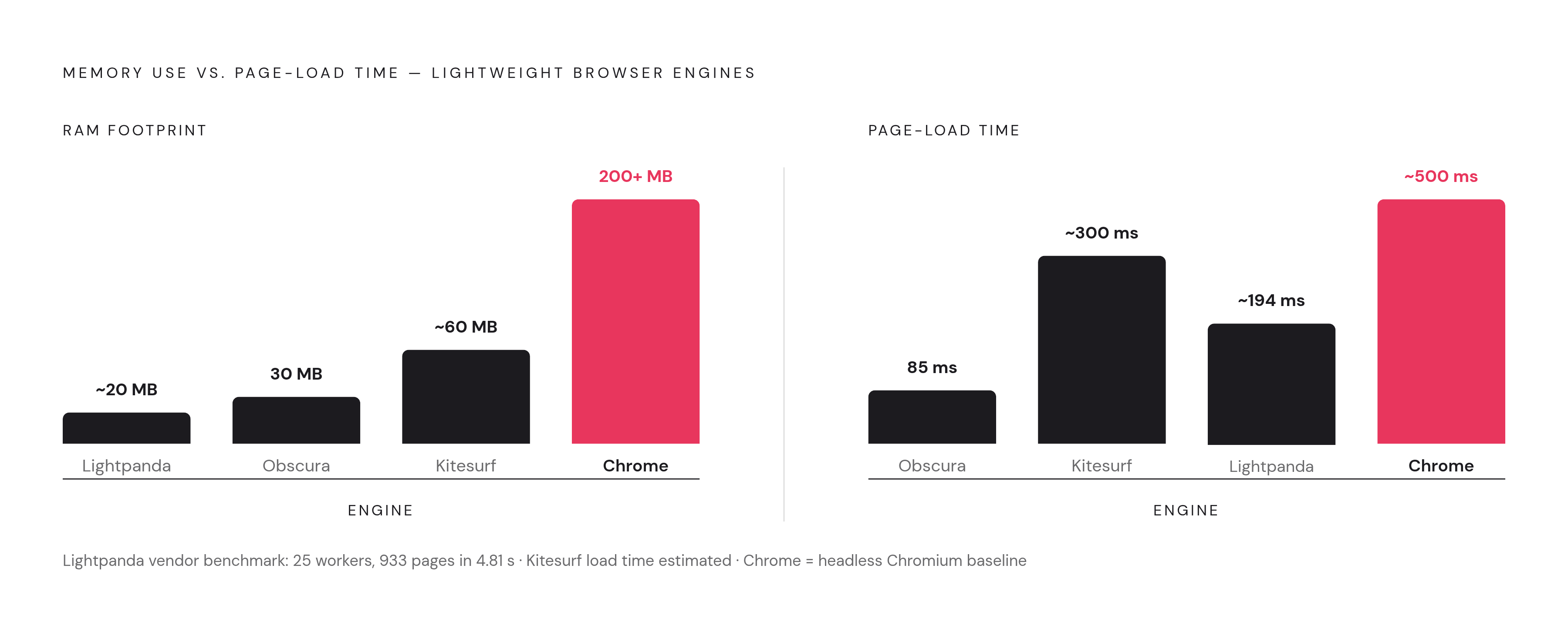
Obscura takes a related but distinct approach: a headless browser written in Rust that embeds V8 for JavaScript execution, shipping as a roughly 70 MB binary with no Chromium or Node.js dependency anywhere in the stack. The project's own figures claim 30 MB of memory against Chrome's 200-plus, an 85-millisecond page load against roughly 500 milliseconds for Chrome, and startup that's effectively instant. An independent live test run by Flowtivity on September 5, 2026 measured 34 MB of peak RAM on a production VPS, against 200-plus MB for headless Chrome under the same conditions. Under parallel load the gap widens further: under parallel load, Obscura's memory use remained a fraction of headless Chrome's at the same worker count. That gap grows with parallelism because Chrome's fixed costs stack linearly with every added instance, while Obscura's don't carry the same weight per process. As of that September test date, the project stood at 24,998 GitHub stars, 1,834 forks, and 60 contributors, gaining roughly 170 stars around that measurement window, and Cloudflare's own engineering blog credits Obscura as the direct inspiration behind Kitesurf's initial prototype. It speaks CDP as well, working as a drop-in backend for existing Puppeteer and Playwright code, and ships a native MCP server for agent use. The constraint that matters most: Obscura doesn't render visuals. There's no layout engine, no paint pipeline, which rules it out for any screenshot-dependent agent task or CSS verification work. Its own benchmark reports roughly 83% Core Web Platform Test coverage, and that figure reflects the project's state at the time of measurement, so earlier pass rates aren't evidence of how it performs on render-enabled workloads.
Lightpanda rounds out the field with a from-scratch build in Zig, aimed squarely at high-performance automation. It supports CDP for both Playwright and Puppeteer, native MCP support, and command-line tools for fetching and converting pages directly. A vendor benchmark reported 25 parallel workers processing 933 JavaScript-dependent demo pages in 4.81 seconds.
Taken together, these three projects point at the same conclusion from different angles. The resource bill teams have been paying for headless Chrome was never really about running a browser. It was about running an entire desktop operating environment to serve a single automated click, and for agent workloads that don't need a human-facing renderer, that bill is now optional.
Methodology & sources
- Headless Chrome at Scale: CPU, RAM, and Cost Optimization Strategies | by ProxyEmpire | Medium
Provided the cost figures for self-hosted Chrome fleets and Cloudflare Browser Rendering pricing, including per-browser-hour rates, concurrency limits, and timeout settings.
- Browser-Use and Computer-Use AI Agent Deployment on GPU Cloud: Self-Host Operator-Style Agents with Vision Models (2026 Guide) | Spheron Blog
Informed the section on VLM memory requirements, including Qwen2.5-VL and Llama 4 Vision VRAM budgets and concurrent agent session sizing.
- Obscura: The Rust Headless Browser Built for AI Agents (Tested)
Provided the independent live-test measurements of Obscura's peak RAM, page-load time, and GitHub star count as of September 5, 2026.
- The headless-browser tax: memory, CPU, and why HTTP clients win when they can
Informed the core framing of Chrome's multi-process architecture, shared memory (/dev/shm) exhaustion, and the zombie-process failure mode.
- https://www.explainx.ai/blog/cloudflare-kitesurf-agent-browser-v8-isolates-august-2026
Informed the description of Cloudflare Kitesurf's architecture, V8 isolates, CDP compatibility, Web Platform Test results, and its origin from the Obscura proof-of-concept.
- Browser Automation at Scale: Headless Chrome, CDP, Playwright, and AI-Native Web Agents in 2026 | Zylos Research
Informed the landscape overview of Playwright, Puppeteer, and Selenium's relative standing in 2026 automation workflows.
- Headless Chrome: Mastering Server-Side Resource Orchestration and Memory Optimization
Informed the optimization patterns section, including the warm pool pattern, recycling policies, request interception, and process reaping with tini.
- Headless Chrome: Configuring and Optimizing Server Memory Consumption | by OnlineProxy | Medium
Informed the description of Chrome's shared memory requirements, the Docker /dev/shm 64 MB cap, and the --disable-dev-shm-usage flag workaround.