Browser-Use Open Source Framework Evaluation for Agent Developers
Framework flexibility trades off reproducibility and auditability in production workflows.

- Written by
- Marcus Trelawney
- Published
- September 26, 2026
- Reading time
- 11 min read
- Sources cited
- 3 sources ↓
What this covers
Browser-Use is an open-source Python framework that lets a large language model drive a real browser. By mid-2026 it had crossed 100,000 GitHub stars, putting it in the same conversation as Dify, Open WebUI, and the official MCP repos. That attention is earned, but star counts and vendor benchmarks tell an agent developer almost nothing about whether Browser-Use holds up in a production pipeline. The gap between what gets published and what happens when a checkout form throws an unexpected modal is where the real decision-making has to happen, and most teams evaluating this framework are looking in the wrong place.
What Browser-Use is in the browser-automation landscape
Browser-Use is MIT-licensed, which matters right away for any team weighing legal exposure against a competitor's more restrictive terms. The pitch is simple: instead of hand-writing XPath or CSS selectors that break the moment a frontend team ships a redesign, you hand the agent a natural-language instruction and let it read the rendered page, figure out what's clickable, plan a sequence of actions, and recover when a cookie banner or upsell overlay shows up uninvited.
The pip-installable open-source library runs against a Chrome runtime you supply, while Browser-Use Cloud is a hosted product that adds stealth browsing, CAPTCHA solving, and proxy rotation, none of which the open-source library gives you out of the box. But two deployment paths run under the Browser-Use name, and confusing them is the first mistake most new users make. One is the pip-installable open-source library, which you run yourself against whatever browser runtime you supply. The other is Browser-Use Cloud, a hosted product that adds stealth browsing, CAPTCHA solving, and proxy rotation, none of which the open-source library gives you out of the box. Talking about "Browser-Use" without saying which one you mean is close to meaningless: the numbers, the costs, and the ways it breaks differ substantially between the two, and anyone citing a benchmark score without naming the variant is either careless or selling something.
Browser-Use's Architecture and Its Control Limitations
The most consequential design decision in Browser-Use is that the framework owns the agent loop. You don't write the steps; you describe the goal, and the model decides, at runtime, what happens next. Stagehand takes the opposite bet: the developer writes deterministic steps for the parts of a workflow that don't change, and only hands the model the sub-steps that are genuinely ambiguous. That's a significant implementation detail. It's a different philosophy, and it produces a different set of ways things go wrong, and teams that pick Browser-Use for its flexibility often discover the cost of that flexibility only after something breaks in production.
Browser-Use's default way of seeing a page is a serialized list of interactive elements pulled from the DOM, with vision available as an add-on rather than the main channel. That's a real trade-off, not a compromise for its own sake. Screenshots are cheap in tokens but miss things that exist in the DOM yet stay visually hidden or occluded. Full DOM trees carry the most decision-relevant detail, but they can run past a million tokens on a dense page, and a single 20-step task run by one high-end model against a page like that can cost close to $40. Serializing the interactive elements while cutting the structural noise is a sensible middle path. It is not a fix for the underlying problem, which is that any representation of a page is a lossy compression of what a human sees.
The price of that flexibility is determinism, and it runs low by design. That's what lets the agent handle a page it's never seen before. It's also what makes a run hard to replay, hard to audit, and hard to explain to a compliance officer asking why the agent clicked a particular button on a particular Tuesday. Anyone weighing Browser-Use for a regulated workflow needs to sit with that trade-off before writing a line of code, not after the first incident report lands on someone's desk.
Reading the benchmark numbers Browser-Use publishes honestly
Browser-Use's own benchmark, BU Bench V1, is built with more care than most vendor suites. It draws 100 hand-selected tasks from five established sources, runs them repeatedly across different models and frameworks, strips out tasks that are trivially easy or that most runs judge impossible, and encrypts the task set to guard against contamination from future model training. Judging is done by an LLM, gemini-2.5-flash, issuing a binary true-or-false verdict. Browser-Use's team defends that choice by pointing out that rubric-style scoring tends to hand middling scores to both real successes and real failures, which blurs the signal rather than sharpening it. That's a defensible call, and one other vendors would do well to copy.
Claude Fable 5 tops the frontier-model field at 80 out of 100 tasks, 12 points ahead of the next-best frontier entry, GPT 5.5, at 68%. That score isn't free: running the full suite on Claude Fable 5 cost $580.87 in API spend, with an average task taking 6 minutes and 53 seconds. Browser-Use's own open-source library, paired with its ChatBrowserUse-2 model, scores 63.3%, enough to beat every standalone frontier model tested on this particular suite. Browser-Use Cloud does better, landing at 78%, a full 16 points ahead of the open-source result. For context, Claude-opus-4-6 is 62%, gemini-3-1-pro is 59.3%, and Claude-sonnet-4-6 is 59%.
Browser-Use's vendor reporting shows its bu-2-0 model lifting internal-eval accuracy from 74.7% to 83.3%, an 8.6-point gain that gets marketed as "+12% accuracy." That qualifier tends to disappear once the claim gets repeated secondhand, and the underlying number is real and measured honestly. It measures the model, not the framework. If you swap in your own model instead of ChatBrowserUse, none of that gain is guaranteed to follow you. The framework score and the model score are two separate claims, because the vendor's marketing does not always keep them separate for you.
Why external benchmarks give a more useful picture
WebVoyager is the benchmark every browser-agent vendor cites, and it's also the one that's stopped meaning much. An independent field-notes compilation found the top four systems all scoring above 93%, with the leading pair separated by a fraction of a point. A benchmark that can't tell first place from fourth is measuring who optimized hardest against a fixed, known list of 643 tasks spread across 15 websites, not capability. Most of those tasks are read-heavy, and they never reveal the friction real production traffic runs into. Any 2026 browser-agent pitch that leads with a WebVoyager score should be read as a marketing claim rather than evidence, and that applies to every vendor making the claim, not just the one in front of you.
LexBench-Browser is the more honest instrument here. It spans 210 tasks across 107 websites, built to support reproducible evaluation across multiple agents, datasets, and models, and it runs against both local and cloud browsers with LLM-as-Judge scoring built in. It also ships a local leaderboard along with efficiency and cost metrics: agent steps, end-to-end latency, token usage. That's the kind of data an engineer needs to size a deployment, not just to brag about a leaderboard rank.
WebBench takes a different route, relying on human evaluation, which runs roughly $3,000 per pass and rules out broad market comparison for most teams. Plans exist to release an open-source automated evaluation framework so teams can run their own agents through it without paying that bill each time. If it lands, that's a real contribution to a field that badly needs one.
The six failure modes that benchmarks do not capture and that decide production outcomes
An agent that clears 78% on a vendor benchmark can still book as few as 22% of shopping carts once it's live against a real site. That gap is the distance between a frozen benchmark task and a page that keeps changing underneath the agent while it runs, and no vendor score has closed it yet.
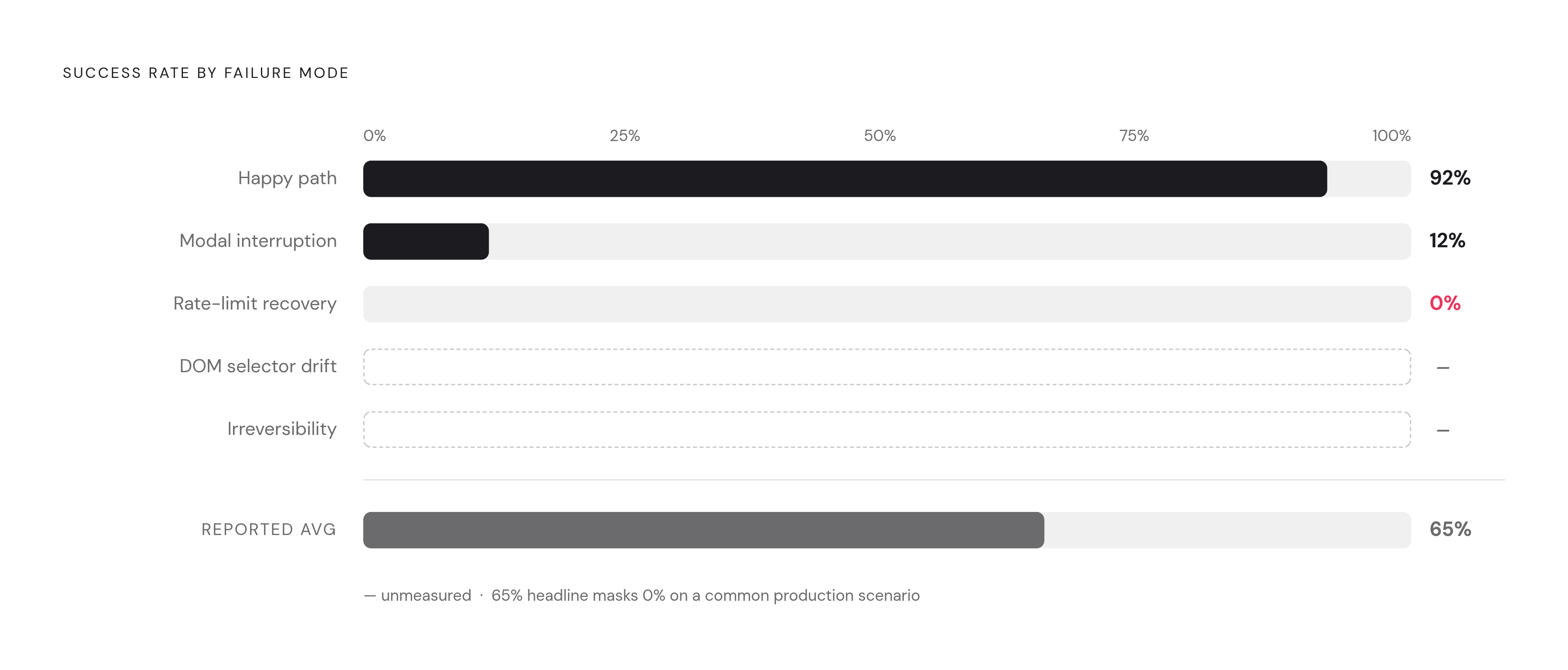
Six failure modes explain most of that gap, and none of them appear cleanly in a benchmark harness. DOM selector drift hits whenever a frontend refactor breaks the element references the agent learned to expect, and it happens constantly, because frontend teams ship changes on their own schedule with no obligation to notify anyone's agent. Screenshot ambiguity appears when two elements look alike but do different things, and the model guesses wrong. Login state is its own category of trouble, including session expiry, an SSO redirect, and a 2FA prompt the agent has no path to resolve. Modal interruptions, cookie banners, upsell overlays, survey popups, are common enough that stratified testing puts agent success on this category at 12%. Rate-limit recovery scores 0% in the same stratified tests, because there's no fallback path once the wall goes up. Irreversibility, a submitted form, a confirmed order, a sent email, is close to untestable in most harnesses, simply because nobody has built a rollback assertion that lets a benchmark check for it safely.
When those six are set against a single aggregate number, the aggregate stops telling you anything useful. A 65% end-to-end success rate can break down into 92% on the happy path, 12% on modal interruption, 0% on rate-limit recovery, and unmeasured results on DOM drift and irreversibility. The average buries exactly the information a developer needs before deciding whether to run an agent unattended or keep a human in the loop.
That bears directly on how to read Browser-Use's own numbers. The open-source library's 63.3% on BU Bench V1 is a legitimate figure for a workflow where a human reviews the output before anything ships. It is not a number to build an unattended, revenue-bearing process on, not without a fallback plan for at least the modal and rate-limit cases, since those are the two where the data already shows the agent failing almost every time.
Browser-Use compared to Stagehand, Skyvern, Playwright, and Playwright MCP
Five frameworks, five different answers to who's actually in control. Browser-Use owns the loop itself. Stagehand leaves the loop with the developer and calls in AI only where it's needed. Skyvern runs its own workflow engine. Playwright MCP hands control to whatever agent you've already built. Plain Playwright gives you nothing but the primitives: you write every line yourself.
That split runs through how each framework reads a page, too. Browser-Use reads serialized elements with vision as an option, not a default. Stagehand leans DOM-oriented and lets the model resolve ambiguity where it comes up. Skyvern goes vision-first with grounding, which is part of why it handles structurally hostile pages, ones where the DOM offers little to grab onto, better than anything else in this comparison. Playwright MCP exposes the browser to whatever agent you've already built. Plain Playwright works off nothing beyond the selectors you wrote yourself.
Determinism follows the same divide. Browser-Use runs low by design, trading predictability for flexibility. Stagehand sits in the middle and climbs toward high once actions get cached and stop needing to be re-decided. Skyvern runs low to medium. Playwright MCP depends entirely on the agent sitting on top of it. Plain Playwright is total, and teams still reach for it when the task is narrow and the page never changes, because there's no reason to pay a model to make a decision that never varies.
Cost tracks a similar curve. Browser-Use runs moderate to high on dense pages, given how much DOM content it's willing to serialize. Stagehand runs low when its cache hits and moderate otherwise. Skyvern carries higher costs than text-only approaches, since vision-language processing on images adds expense on top of ordinary LLM calls. Playwright MCP costs depend on the agent layered on top of it. Plain Playwright costs next to nothing, because there's no model in the loop burning tokens.
Stagehand is the framework to reach for when the workflow is mostly stable and only occasionally ambiguous, and the head-to-head numbers back that up with a caveat. Stagehand is MIT-licensed and ships SDKs in TypeScript, Python, and Go. Its hybrid model, deterministic Playwright for the stable parts of a workflow, AI only where the page actually varies, means that LLM costs fall in proportion to how much of the workflow stays deterministic. It's also generally easier to debug than Browser-Use, precisely because the developer, not the framework, controls the loop. Reported head-to-head comparisons have shown the two frameworks trading off reliability against speed depending on task type. Reliability and speed can pull in opposite directions in that way. Which one a team needs more depends on what the workflow can tolerate failing, and for anything touching money or an irreversible action, reliability should win that argument every time.
Skyvern's vision-language approach adds real image-processing cost on top of ordinary text LLM calls, but its no-code workflow builder can claw back development time for teams without engineers to spare. Self-hosting Skyvern means working through AGPL-3.0 licensing, a genuine procurement hurdle for any company with legal review sitting in the deployment path. Its best fit is RPA replacement on portals and forms where DOM access simply fails, since the vision approach handles structurally hostile pages better than any other option covered here.
Google's Chrome Auto Browse signals major-platform interest in the browser-agent category, though detailed figures aren't public yet for a proper head-to-head. It also raises a fair question about where independent open-source tools stand five years out, one that any team making an architectural bet meant to last that long should take seriously before committing.
Operational burden: self-hosting costs, cloud pricing, and the requirements of the open-source path
Framework choice affects two other decisions less: where the Chrome runtime actually lives, and which model drives the agent. Get that order backwards, and the cost conversation starts in the wrong place.
Browser-Use Cloud prices sessions at $0.02 with no subscription required, and network traffic gets billed separately on top of that base rate. The default model on the V4 Cloud API is GPT-5.6 Luna, priced at $0.24 per million input tokens, $0.024 per million cached input tokens, and $1.44 per million output tokens. Concurrency comes tiered: 3 simultaneous sessions on Free, 25 on Dev, 200 on Business, 500 on Scaleup. New eligible accounts get $15 in one-time credits, and as of the April 3, 2026 changelog, getting started costs nothing up front. Teams that already have proxy contracts or model commitments in place can bring their own proxy and their own API key, paying Browser-Use only for orchestration rather than for infrastructure they've already bought elsewhere. V4 agents can also run on a schedule, and an "Agency" skill for proactive, self-initiated work launched August 17, 2026.
On the model side, ChatBrowserUse is the vendor's own recommendation, invoked as ChatBrowserUse(model='bu-2-0'), and since May 20, 2026, the older bu-1-0 model has been priced identically to bu-2-0. The gateway also accepts provider-prefixed model IDs, so teams aren't locked into Browser-Use's own models if they'd rather route through something else.
The number that puts all of this in perspective is the $580.87 Claude Fable 5 cost to clear the 100 tasks in BU Bench V1. Framework fees are a rounding error next to what a frontier model burns through at scale. Any cost projection for a Browser-Use deployment that starts with the per-session price and skips the model bill has missed the bulk of the expense, because the model bill, not the orchestration layer, is what actually drains the budget.
Methodology & sources
- 11 Best AI Browser Agents in 2026
Provided the 100,000 GitHub stars figure cited in the opening paragraph.
- Best Open-Source Browser-Agent Frameworks (2026)
Provided the ~$40 per task cost figure cited when discussing token costs on dense pages.
- https://browser-use.com/posts/ai-browser-agent-benchmark
Provided the benchmark scores, API costs, and timing data for BU Bench V1 across models including Claude Fable 5, GPT 5.5, and Browser-Use Cloud.