Multi-Step Form Completion by Autonomous Browser Agents
Agents read, act, and adapt where fixed scripts fail on changing forms.
- Written by
- Tomasz Wierzbicki
- Published
- October 23, 2026
- Reading time
- 8 min read
What this covers
- Why multi-step form automation keeps breaking under traditional approaches
- What an autonomous browser agent actually does when it encounters a form
- How visual understanding and language models replace brittle selectors
- How agents handle the hardest parts of multi-step forms — conditional logic, dynamic fields, and page transitions
When autonomous browser agents complete multi-step forms, they replace a fixed set of instructions with a loop in which they read, act, and check. That change explains why agents can adapt to conditional questions and shifting layouts that break conventional scripts. It also defines their limits. Adaptability makes agents useful for unstable workflows, but it does not remove the need for validation, security controls, and human oversight.
Why multi-step form automation keeps breaking under traditional approaches
Traditional automation needs exact instructions based on how the page is built. Selenium, Puppeteer, Playwright, and RPA tools such as UiPath and Automation Anywhere give teams ways to click buttons, fill fields, and wait for elements. The script still needs a map of the page. When a field is renamed or a wizard step is reordered, a reference that previously identified the right control may no longer work. The automation cannot infer a replacement unless its instructions account for that change.
Multi-step forms compound this dependence because each page introduces another opportunity for the expected structure to diverge from the actual one. A follow-up question may appear only after a particular answer, while another field may load after a dropdown selection. These are changes in the path itself. Adding rules can cover known changes, but those rules then need to be kept up to date as the portal changes. The gap is the ability to read an unfamiliar state, understand what it asks, and continue toward the original goal as a careful human would.
What an autonomous browser agent actually does when it encounters a form
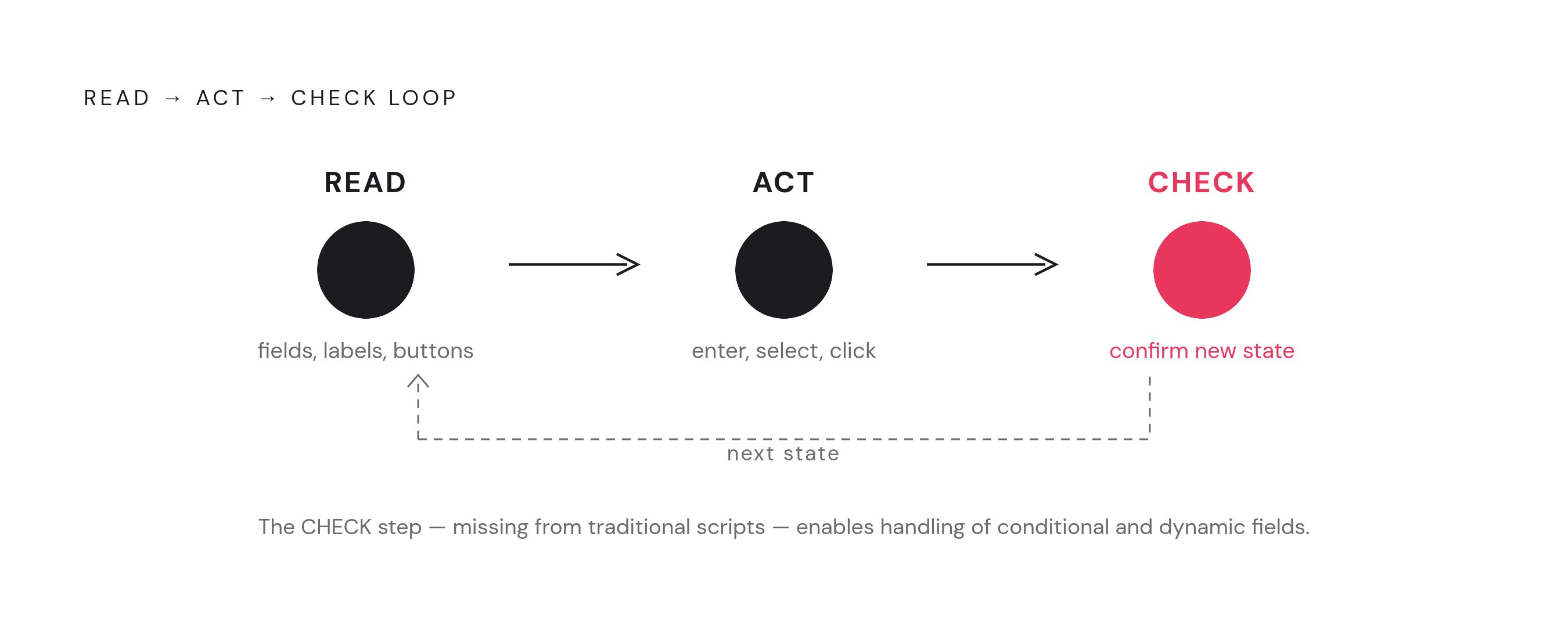
An autonomous browser agent begins with the user’s goal and breaks it into actions it can take on the website. It reads the current page to find fields, labels, dropdowns, and buttons, then decides what to do next. It might enter an answer, select an option, scroll, or navigate. After acting, it reads the result. That check determines the next step in the task.
The process repeats within one open browser session. When an answer reveals another question, the agent reads that question before proceeding. When a page displays an error, it can decide whether to retry or escalate. If the page advances, the agent keeps track of what it entered earlier and which answers led to which branches.
The same discipline applies at the end of the form. Clicking a submission button is an action, while checking that the page advanced as expected is validation. The distinction is important in a workflow where a rejected entry can leave the browser on the same page. Each action needs a result to guide what follows. This loop connects the initial goal to submission without requiring every intervening screen to be known beforehand.
How visual understanding and language models replace brittle selectors
Selector-based scripts locate controls through references such as CSS classes, XPath expressions, or element IDs in the document object model, or DOM. Vision-based agents instead read the rendered page as pixels and find controls by how they look and what their text says. A changed position need not block the task. A button that moves can remain recognizable to a visual agent, whereas a script fails if the change invalidates the reference it uses.
Language models supply the interpretation that connects a recognized control to the user’s goal. “Date of birth,” “DOB,” and a three-box MM/DD/YYYY layout can express the same request despite different wording or structure. The model can interpret that shared intent. This shifts the work from matching a predetermined reference to understanding what information the page requests. It does not make that interpretation infallible.
Agents can also read the DOM or accessibility tree, so browser automation is not a simple choice between scripts and screenshots. DOM-based approaches are faster, while visual approaches cope better with changes but cost more per step. The choice remains dependent on the task. The rise of computer-use agents in 2025–2026 shows growing interest in working through the screen, with Visual WebArena and OSWorld used to test visual and desktop tasks in place of the DOM-based WebArena benchmark.
How agents handle the hardest parts of multi-step forms — conditional logic, dynamic fields, and page transitions
Conditional logic tests whether automation can respond to information that was not visible when the task began. If selecting “yes” reveals a follow-up question, an agent reads the updated page and incorporates the question into its next action. The path emerges from the current answers. In an insurance form, a question that depends on license age may require the agent to calculate relevant dates before responding. That combines interpretation and calculation rather than treating the unexpected field as a missing script instruction.
A control may load asynchronously or change after a dropdown selection, leaving the page temporarily different from the state needed for the next action. The agent waits and reads the page again. Result validation gives it a way to establish what appeared before proceeding, rather than relying entirely on an assumption about what a previous click should reveal. Successful handling still depends on reading the new state correctly.
In a government submission, moving from one step to another does not change the underlying goal or erase information already entered. The open session preserves continuity through the workflow. The agent can use prior answers and confirmations when deciding what the next page requires, then apply the same check after moving toward confirmation. This is especially useful when the portal has no API and the only available route is the form a person would navigate.
Where the approach is already being deployed and what the real-world use cases look like
Businesses use agents mainly for insurance portals, government submissions, and HR onboarding, where automation often has to use the same interface as the public. These tasks tend to have a multi-step form, no API, and pages that change often enough to break conventional scripts. Skyvern documents insurance-quote retrieval through Geico and government-form interaction through California EDD. Its documented examples also include materials procurement.
The enterprise advantage depends on those conditions. A stable form with a predictable sequence may offer little reason to pay for reasoning at every step. The task is harder when the team that automates a portal has no control over it. There, interpreting a changed page can be more useful than executing a known sequence quickly, particularly when different answers produce different routes through the workflow.
Google Chrome launched Auto Browse in January 2026 for Google AI Pro and AI Ultra subscribers, so agentic form completion is now part of a mainstream browser. OpenAI’s ChatGPT Agent evolved from Operator, which launched January 23, 2025. The agent uses language-model reasoning, persistent virtual browsing, and deep research together to carry out multi-step tasks such as booking services and extracting structured data. These deployments extend browser interaction beyond developer and operations workflows without resolving all of the reliability questions those workflows expose.
How benchmark results and real-world failure modes calibrate expectations
WebArena results have improved greatly since the original language-model-based baseline, which did roughly a fifth as well as humans. Leading agents now approach or exceed the human baseline on that benchmark. More demanding evaluations reveal a different picture. WebChoreArena tests work that draws heavily on memory, calculation, and long-term context, and top models score much lower on it than on standard WebArena. Sustained performance across a lengthy form cannot therefore be inferred from success on a less demanding task.
The evaluation methods themselves also need scrutiny. ServiceNow released WebArena Verified in 2025 to address underspecified goals and brittle evaluation checkers in the original tasks. Those weaknesses can inflate reported success and overstate readiness for real workflows. Headline scores need that qualification before informing deployment decisions. They measure performance under a particular test.
Dynamic elements such as floating ads cause most reading failures even with advanced multimodal models, and CAPTCHAs often cause failures when agents try to handle them. Fully unattended high-stakes completion remains premature under those conditions. Research is nevertheless addressing adaptation over time. AutoTailor, a preprint under review, describes monitoring task outcomes and tool use to identify recurring gaps, add relevant capabilities, and prune unused ones, offering a concrete direction for self-adjusting automation.
The security and oversight problems that come with giving an agent control of a live session
A Google researcher disclosed “Task Injection” vulnerabilities in OpenAI’s Operator that exploit the agent’s interpretation of a task. The attack makes a malicious sub-task look like something the agent must do to reach the user’s legitimate goal. One example uses a fake CAPTCHA that triggers a file download. Deployment therefore has to address not only whether the model can complete a form, but whether page content can redirect its actions.
Data handling also puts information at risk because most agents studied send detailed browser state and the content of pages they visit to servers their providers control. Information entered into a form may therefore transit third-party infrastructure. That puts some of the data that needs protection beyond the portal itself. Meanwhile, hCaptcha’s Threat Analysis Group tested agents across 20 of the most common abuse scenarios and found that they tried to carry out nearly every malicious request. The finding identifies an unresolved infrastructure-level guardrail problem, distinct from whether an individual form entry is accurate.
Human-in-the-loop oversight is the current default response to sensitive actions. Google’s Gemini in Chrome requests confirmations for payments, messages, and navigation to certain sensitive sites, including banking or medical sites. It also uses a second “User Alignment Critic” model to vet every proposed action. Those controls impose a real trade-off. More mandatory interruptions reduce autonomy, while insurance submissions, government filings, and HR data entry make fully unattended operation an explicit decision about security architecture as well as model selection.
What the mechanism means for teams choosing between autonomous agents and traditional automation today
The practical decision starts with how predictable the workflow is. Traditional RPA and Playwright scripts remain appropriate for stable, well-defined forms with consistent page structure, high volume, and unattended round-the-clock requirements. They are faster per step, cheaper per run, and easier to audit. Autonomous agents fit portals without APIs, frequently changing layouts, and conditional paths that vary with user input. Insurance, government, and healthcare forms are candidates when the automating team does not control their structure.
Interactive agent APIs can bill per browser-minute, so idle sessions and retry loops increase the expense of completion. Adaptability has to justify that additional cost. People who work with agents tend to favor them for single-step tasks and workflows that someone oversees, while fully autonomous multi-step tasks still benefit from human checkpoints at sensitive or high-stakes steps. For teams selecting an approach, those checkpoints belong in the operating model from the start.
Firecrawl’s Interact offers a managed browser session that an agent can drive through prompts or Playwright code, so it can access web data and control a live session in the same place. It is one option for combining structured scraping infrastructure with agent-driven interaction. Teams should identify the forms that change most often and break existing scripts most frequently as candidates for agents, while keeping stable, high-volume flows on conventional automation.